Run History
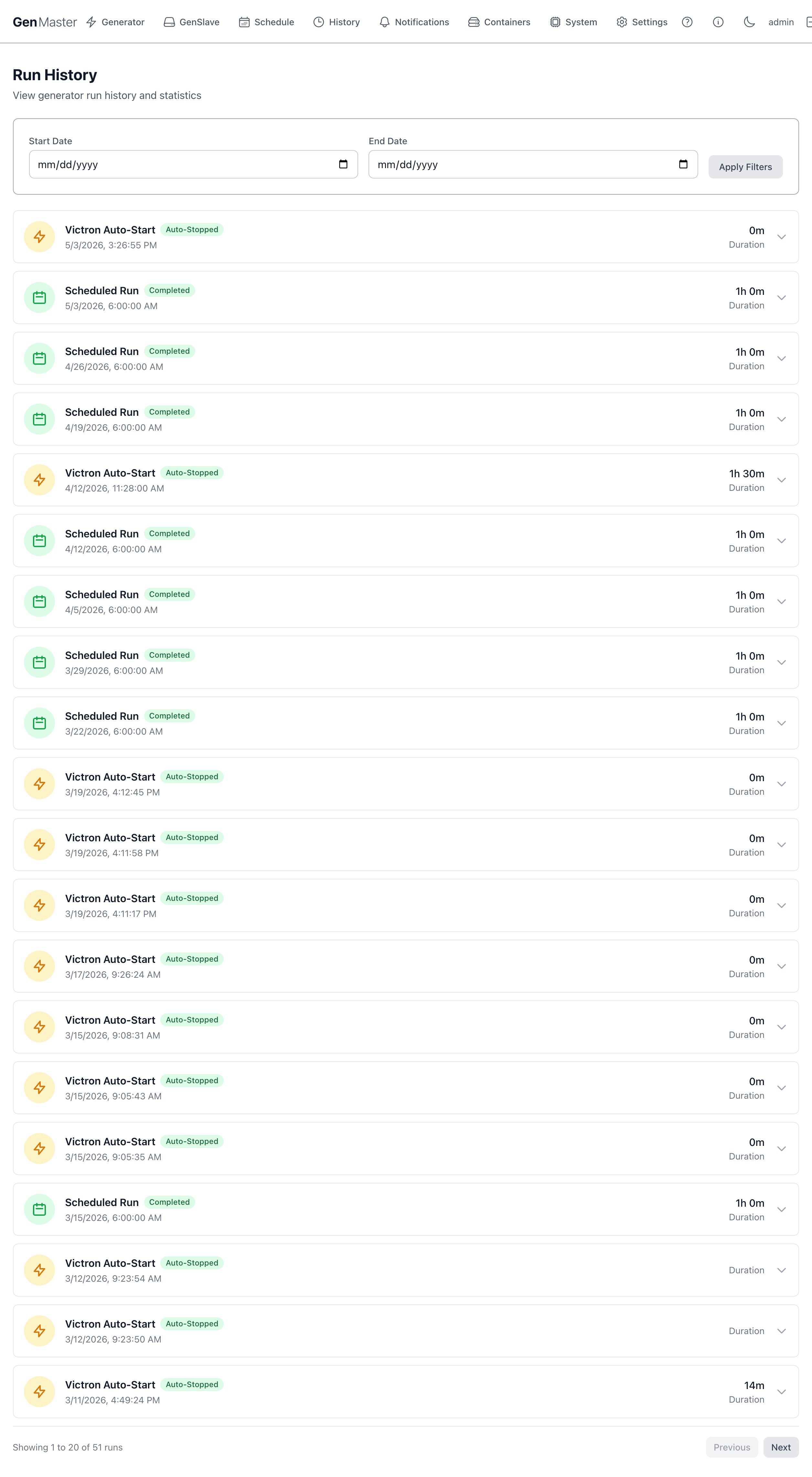
The Run History page is the audit log for your generator. Every start and stop event — whether triggered by Victron, a schedule, or a manual action — is recorded here with its trigger source, status, start time, and duration.
Filters
Two date pickers let you narrow the list:
| Field | Behavior |
|---|---|
| Start Date | Earliest start time to include. Leave blank for no lower bound. |
| End Date | Latest start time to include. Leave blank for no upper bound. |
| Apply Filters | Refreshes the list with the new bounds. |
The filters apply to the start time of each run — runs that began before the start date but ended after will be excluded.
Run rows
Each row in the list represents a single run with the following information:
| Field | Meaning |
|---|---|
| Trigger | What caused the run to start: |
| • Victron Auto-Start — Cerbo GX raised the GPIO signal. | |
| • Scheduled Run — a cron schedule fired. | |
| • Manual Start — operator clicked Start in the UI. | |
| • Exercise Run — automated weekly/biweekly maintenance run. | |
| Status | What happened: |
| • Completed — ran to its planned duration without issue. | |
| • Auto-Stopped — Victron released the signal or the schedule duration expired. | |
| • Manual Stop — operator clicked Stop. | |
| • Failed — start or stop command returned an error. | |
| • Power Loss — GenMaster reboot orphaned the run record. | |
| Start time | Wall-clock timestamp the run began. |
| Duration | Total elapsed time between start and stop. Empty if the run is still in progress or was orphaned. |
Reading the trigger column
A long sequence of short Victron Auto-Start runs (under 5 minutes each) often means your battery SOC is right at the trigger threshold and Victron is bouncing. Consider widening the deadband on the Cerbo GX, or enabling Run Time Limits → Minimum Run Time.
Pagination
20 runs per page. Use Previous / Next at the bottom to navigate. The "Showing X to Y of Z runs" label tells you how many records match your current filters.
Interpreting common patterns
| Pattern | Likely meaning |
|---|---|
| Many short Victron runs in a tight window | SOC bouncing across threshold — adjust Cerbo deadband. |
| Scheduled runs in Failed state | GenSlave was offline or disarmed at trigger time. Check GenSlave for connection issues. |
| Long gaps between any runs | Generator hasn't run for a while — consider adding an Exercise Schedule. |
| Power Loss entries | GenMaster crashed mid-run. The state machine recovers safely on reboot but you should check docker compose logs genmaster for the underlying cause. |
Fuel consumption (per-run)
If you've configured the Generator Information section with fuel rates, each completed run also includes an estimated fuel-used figure visible when you expand the row (UI permitting). The cumulative total is shown on the Generator page in the Fuel Usage card.
Exporting
The Run History page itself doesn't ship an export-to-CSV button in this version. To extract the raw data:
docker compose exec genmaster_db psql -U genmaster -d genmaster \
  -c "COPY (SELECT * FROM generator_runs ORDER BY start_time) TO STDOUT WITH CSV HEADER;" > runs.csv
What's next
- Add new schedules from Schedule.
- Tune Victron behavior in Victron Integration.