Notifications Setup Guide
This guide covers how to configure notifications for generator events using Apprise and system notification channels.
Table of Contents
- Overview
- Apprise Integration
- GenMaster Notifications
- GenSlave Notifications
- System Notification Events
- Notification Channels
- Testing Notifications
- Troubleshooting
Overview
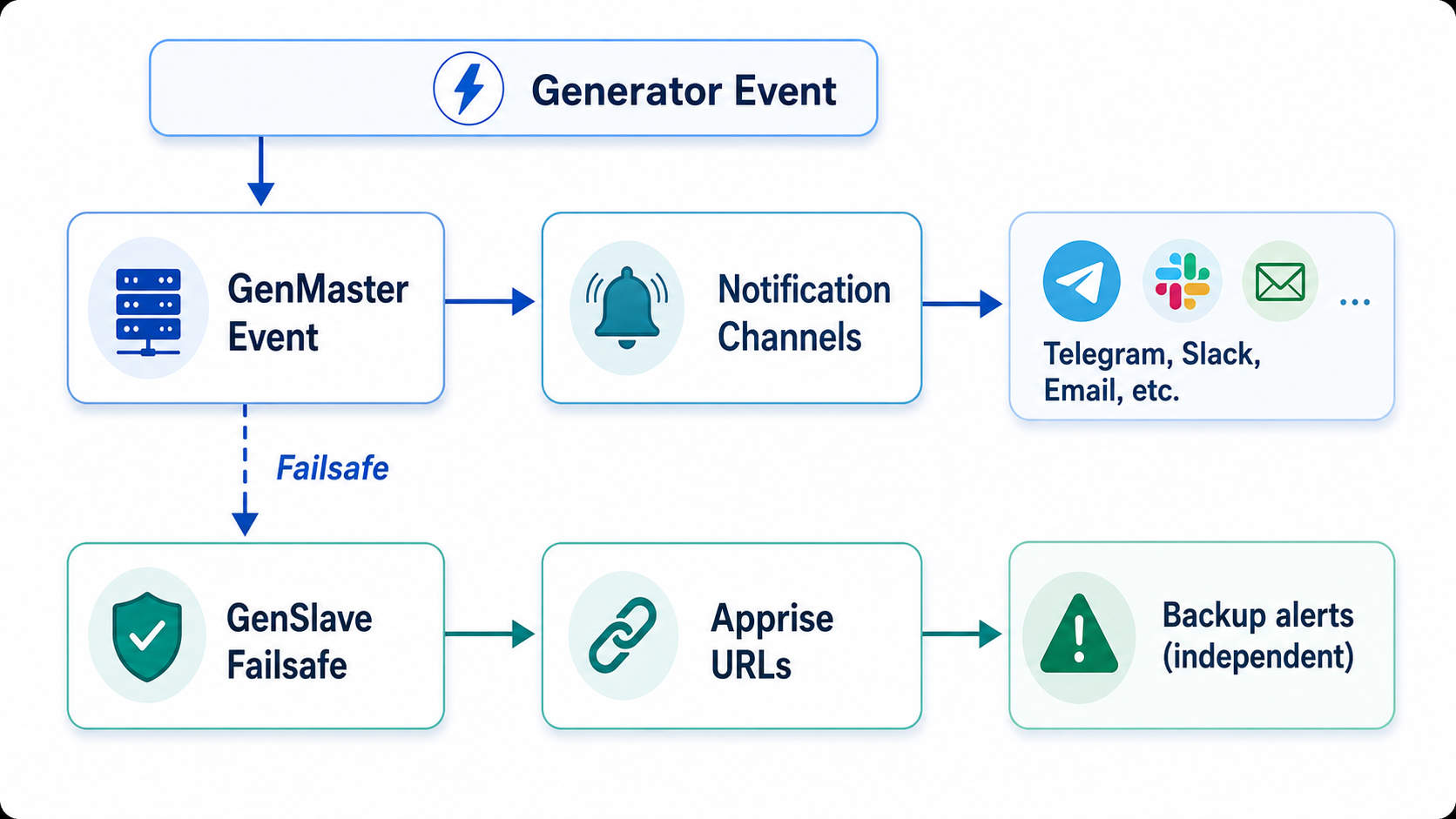
The RPi Generator Control system supports notifications at two levels:
| Component | Purpose | Notification Type |
|---|---|---|
| GenMaster | System events, generator status | Channels + Groups |
| GenSlave | Failsafe alerts, local events | Apprise URLs |
Notification Flow
Apprise Integration
Apprise is a notification library supporting 80+ services.
Supported Services
| Service | URL Format |
|---|---|
| Telegram | tgram://bottoken/chatid |
| Slack | slack://tokenA/tokenB/tokenC/channel |
| Discord | discord://webhook_id/webhook_token |
| Pushover | pover://user_key@api_token |
mailto://user:pass@gmail.com |
|
| Twilio SMS | twilio://account_sid:auth_token@from/to |
| ntfy | ntfy://topic |
| Many more | See Apprise Wiki |
URL Examples
Telegram:
Slack Webhook:
Discord Webhook:
Email (Gmail):
ntfy:
GenMaster Notifications
GenMaster uses a channel-based notification system with flexible grouping.
Notification Channels
Create channels for each notification service:
Via Web UI: 1. Navigate to Settings > Notifications 2. Click Add Channel 3. Configure: - Name: Descriptive name (e.g., "My Telegram") - Type: Select service type - Configuration: Service-specific settings - Enabled: Toggle on/off
Via API:
curl -X POST https://your-genmaster/api/notifications/channels \
  -H "Authorization: Bearer YOUR_TOKEN" \
  -H "Content-Type: application/json" \
  -d '{
    "name": "Main Telegram",
    "channel_type": "telegram",
    "config": {
      "bot_token": "123456789:AAHdqTcvCH1vGW...",
      "chat_id": "-1001234567890"
    },
    "enabled": true
  }'
Notification Groups
Group channels together for different purposes:
curl -X POST https://your-genmaster/api/notifications/groups \
  -H "Authorization: Bearer YOUR_TOKEN" \
  -H "Content-Type: application/json" \
  -d '{
    "name": "Critical Alerts",
    "description": "High-priority notifications",
    "channel_ids": [1, 2, 3],
    "enabled": true
  }'
Channel Types
| Type | Config Fields |
|---|---|
telegram |
bot_token, chat_id |
slack |
webhook_url |
discord |
webhook_url |
email |
smtp_host, smtp_port, username, password, from_email, to_emails |
pushover |
user_key, api_token |
apprise |
urls (array of Apprise URLs) |
webhook |
url, headers, method |
GenSlave Notifications
GenSlave uses Apprise URLs directly for failsafe notifications.
Configuration
Via Environment Variable:
Via API (through GenMaster):
curl -X POST https://your-genmaster/api/genslave/notifications \
  -H "Authorization: Bearer YOUR_TOKEN" \
  -H "Content-Type: application/json" \
  -d '{
    "apprise_urls": [
      "tgram://123456:ABC.../chatid",
      "slack://T00/B00/XXX"
    ]
  }'
Notification Cooldown
Prevent notification spam with cooldown settings:
curl -X POST https://your-genmaster/api/genslave/notifications/settings \
  -H "Authorization: Bearer YOUR_TOKEN" \
  -H "Content-Type: application/json" \
  -d '{
    "failsafe_cooldown_minutes": 5,
    "restored_cooldown_minutes": 5
  }'
GenSlave Events
| Event | When Triggered |
|---|---|
| Failsafe Triggered | Communication lost with GenMaster |
| Heartbeat Restored | Communication restored after failsafe |
System Notification Events
GenMaster can send notifications for various system events.
Available Events
| Event | Description |
|---|---|
generator_started |
Generator has started |
generator_stopped |
Generator has stopped |
slave_connected |
GenSlave connection established |
slave_disconnected |
GenSlave connection lost |
override_enabled |
Manual override activated |
override_disabled |
Manual override deactivated |
exercise_started |
Exercise run started |
exercise_completed |
Exercise run completed |
max_runtime_reached |
Generator hit runtime limit |
lockout_activated |
Runtime lockout enabled |
lockout_cleared |
Runtime lockout cleared |
Configuring Event Notifications
Via Web UI: 1. Navigate to Settings > System Notifications 2. For each event type: - Toggle enabled/disabled - Select notification channels/groups - Configure message template (optional)
Via API:
curl -X PUT https://your-genmaster/api/system-notifications/generator_started \
  -H "Authorization: Bearer YOUR_TOKEN" \
  -H "Content-Type: application/json" \
  -d '{
    "enabled": true,
    "channel_ids": [1, 2],
    "group_ids": [1],
    "title_template": "Generator Started",
    "body_template": "Generator started at {{start_time}} - Reason: {{reason}}"
  }'
Template Variables
Templates support these variables:
Generator Events:
- {{run_id}} - Run ID
- {{start_time}} - Start timestamp
- {{stop_time}} - Stop timestamp
- {{runtime}} - Formatted runtime
- {{reason}} - Start/stop reason
- {{fuel_gallons}} - Fuel used
- {{fuel_type}} - Fuel type
System Events:
- {{timestamp}} - Event timestamp
- {{status}} - Current status
- {{details}} - Event details
Notification Channels
Telegram Setup
- Create a bot via @BotFather
- Get your bot token
- Get your chat ID (message @userinfobot or add bot to group)
{
  "channel_type": "telegram",
  "config": {
    "bot_token": "123456789:AAHdqTcvCH1vGWJxfSeofSAs0K5PALDsaw",
    "chat_id": "123456789"
  }
}
Group Chat ID: Use negative number (e.g., -1001234567890)
Slack Setup
- Create a Slack app or use incoming webhook
- Get webhook URL
{
  "channel_type": "slack",
  "config": {
    "webhook_url": "https://hooks.slack.com/services/T00/B00/XXX"
  }
}
Discord Setup
- In channel settings, create a webhook
- Copy webhook URL
{
  "channel_type": "discord",
  "config": {
    "webhook_url": "https://discord.com/api/webhooks/123/abc"
  }
}
Email Setup
{
  "channel_type": "email",
  "config": {
    "smtp_host": "smtp.gmail.com",
    "smtp_port": 587,
    "username": "your@gmail.com",
    "password": "app-specific-password",
    "from_email": "Generator <your@gmail.com>",
    "to_emails": ["recipient@example.com"]
  }
}
Gmail: Use an App Password
Pushover Setup
{
  "channel_type": "pushover",
  "config": {
    "user_key": "your_user_key",
    "api_token": "your_api_token"
  }
}
Testing Notifications
Test a Channel
curl -X POST https://your-genmaster/api/notifications/channels/1/test \
  -H "Authorization: Bearer YOUR_TOKEN"
Test GenSlave Notifications
curl -X POST https://your-genmaster/api/genslave/notifications/test \
  -H "Authorization: Bearer YOUR_TOKEN"
Send Manual Notification
curl -X POST https://your-genmaster/api/notifications/send \
  -H "Authorization: Bearer YOUR_TOKEN" \
  -H "Content-Type: application/json" \
  -d '{
    "title": "Test Notification",
    "body": "This is a test message",
    "channel_ids": [1, 2]
  }'
Troubleshooting
Notifications Not Sending
-
Check channel is enabled:
-
Check event is configured:
- Verify event type has channels assigned
-
Verify event is enabled
-
Check logs:
Telegram Not Working
-
Verify bot token:
-
Verify chat ID:
- Message the bot first
-
For groups, bot must be added to group
-
Check bot permissions:
- Bot needs permission to send messages
Email Not Working
- Check SMTP settings:
- Verify host and port
-
Try port 465 (SSL) or 587 (TLS)
-
Check authentication:
- Gmail requires App Password
-
Some providers require "less secure apps"
-
Check firewall:
- Outbound SMTP may be blocked
Slack/Discord Not Working
- Verify webhook URL:
-
Test manually with curl
-
Check webhook is active:
- Webhooks can be deleted/disabled
High Notification Volume
- Enable cooldowns:
- Set appropriate cooldown periods
-
Prevents notification spam
-
Adjust event triggers:
- Disable non-critical events
- Use groups for different priority levels
Best Practices
1. Use Multiple Channels
Configure backup notification channels: - Primary: Telegram/Slack - Backup: Email - Critical: SMS (Twilio)
2. Set Appropriate Cooldowns
Prevent notification fatigue: - Failsafe notifications: 5-10 minute cooldown - Status updates: 1-5 minute cooldown
3. Test Regularly
Verify notifications work: - Test after configuration changes - Test after system updates - Test backup channels periodically
4. Use Groups for Organization
- Critical: All channels for emergencies
- Status: Primary channel for routine updates
- Admin: Detailed logs for debugging
5. Monitor Notification History
Review sent notifications:
curl "https://your-genmaster/api/notifications/history?limit=50" \
  -H "Authorization: Bearer YOUR_TOKEN"
Next Steps
- Generator Controls - Events that trigger notifications
- GenSlave Setup - Configure GenSlave notifications
- Troubleshooting - More debugging tips