GenMaster/GenSlave System Architecture
Overview
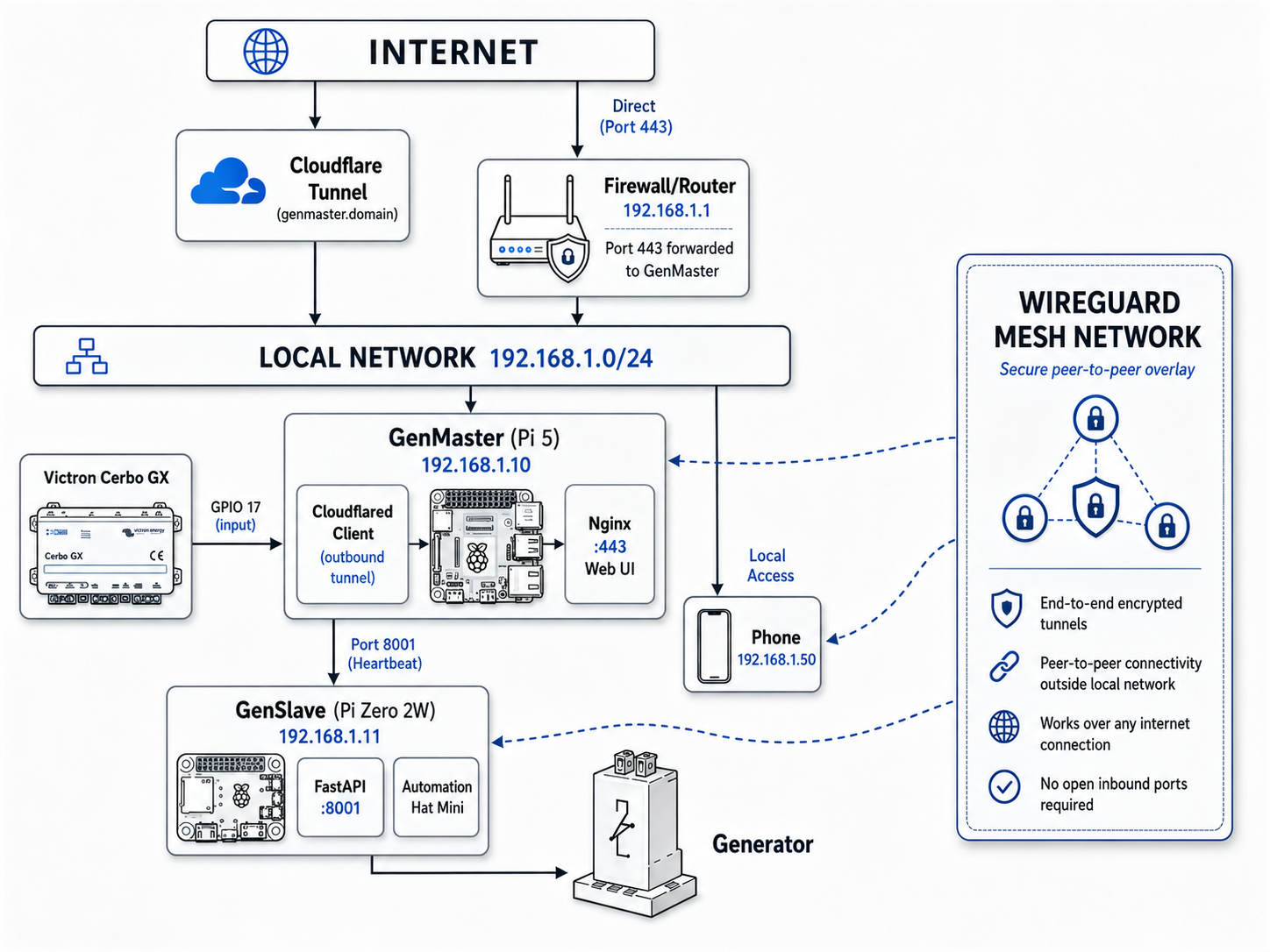
The RPi Generator Control system is a distributed two-device architecture for automated generator management. It uses a master-slave pattern where GenMaster (Raspberry Pi 5) handles the web interface, business logic, and Victron integration, while GenSlave (Pi Zero 2W) controls the physical relay for generator start/stop.
System Architecture
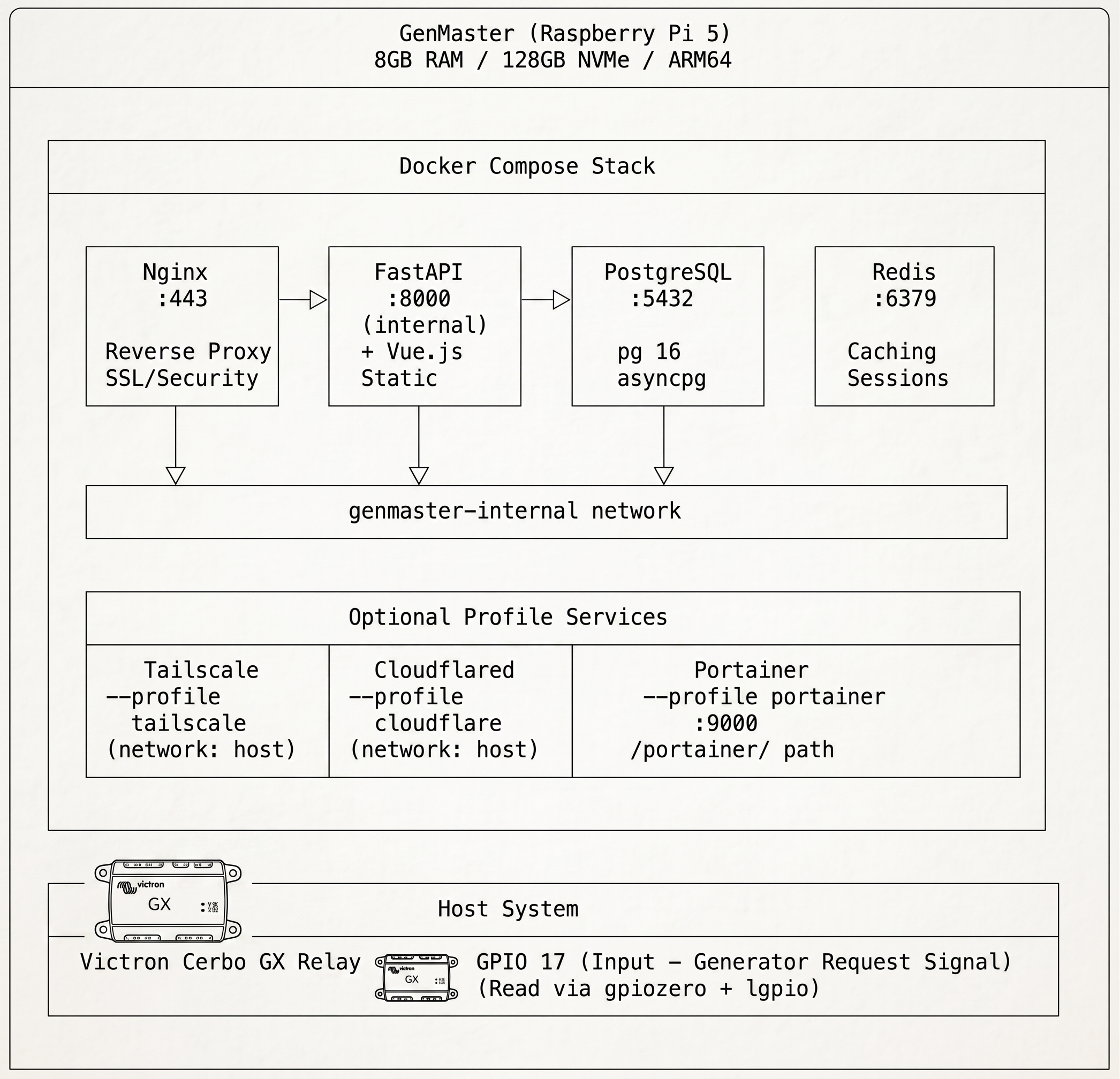
GenMaster Docker Container Architecture
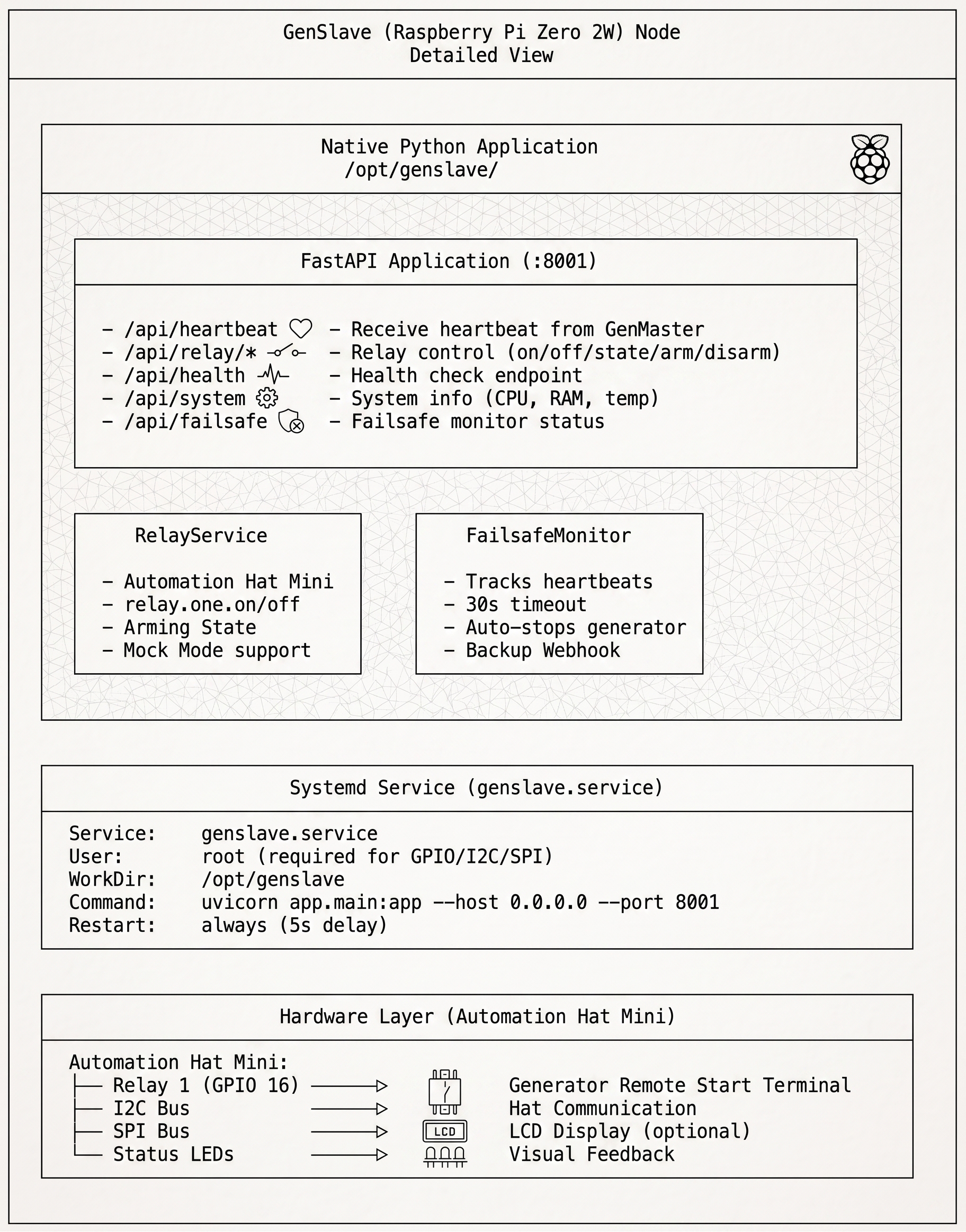
GenSlave Container Architecture
GenSlave runs as a single Docker container on the Pi Zero 2W. The image
(rjsears/pizero_generator_control:genslave) is built for linux/arm/v6
and ships from Docker Hub, so the Pi Zero only needs Docker installed —
no Python, no virtualenv, no system packages.
The container runs privileged for GPIO access to the Pimoroni Automation
Hat Mini, and uses network_mode: host so Tailscale on the host can route
inbound API calls from GenMaster directly to the container's port 8001.
GenSlave Host File Structure
The Pi Zero only stores the compose file and runtime state — the application code itself lives entirely inside the image:
/opt/genslave/
├── docker-compose.yaml      # Pulled from the repo on install
└── .env                     # Per-host configuration (API secret, GenMaster URL, etc.)
Two named Docker volumes hold mutable state across container recreates:
| Volume | Mount inside container | Purpose |
|---|---|---|
genslave_data |
/opt/genslave/data |
SQLite database (optional state cache) |
genslave_logs |
/opt/genslave/logs |
Application logs |
What's inside the image
The container's /app directory contains the FastAPI service:
/app/
├── main.py                  # FastAPI application
├── config.py                # Configuration from environment
├── routers/
│   ├── health.py            # Health check + heartbeat
│   ├── relay.py             # Relay control + arming
│   └── system.py            # System info
└── services/
    ├── relay.py             # Automation Hat Mini control
    └── failsafe.py          # Heartbeat monitor
Updates are deployed by pulling a newer tag of the image and recreating the container — no source files on the Pi Zero ever change.
Request Flow Architecture
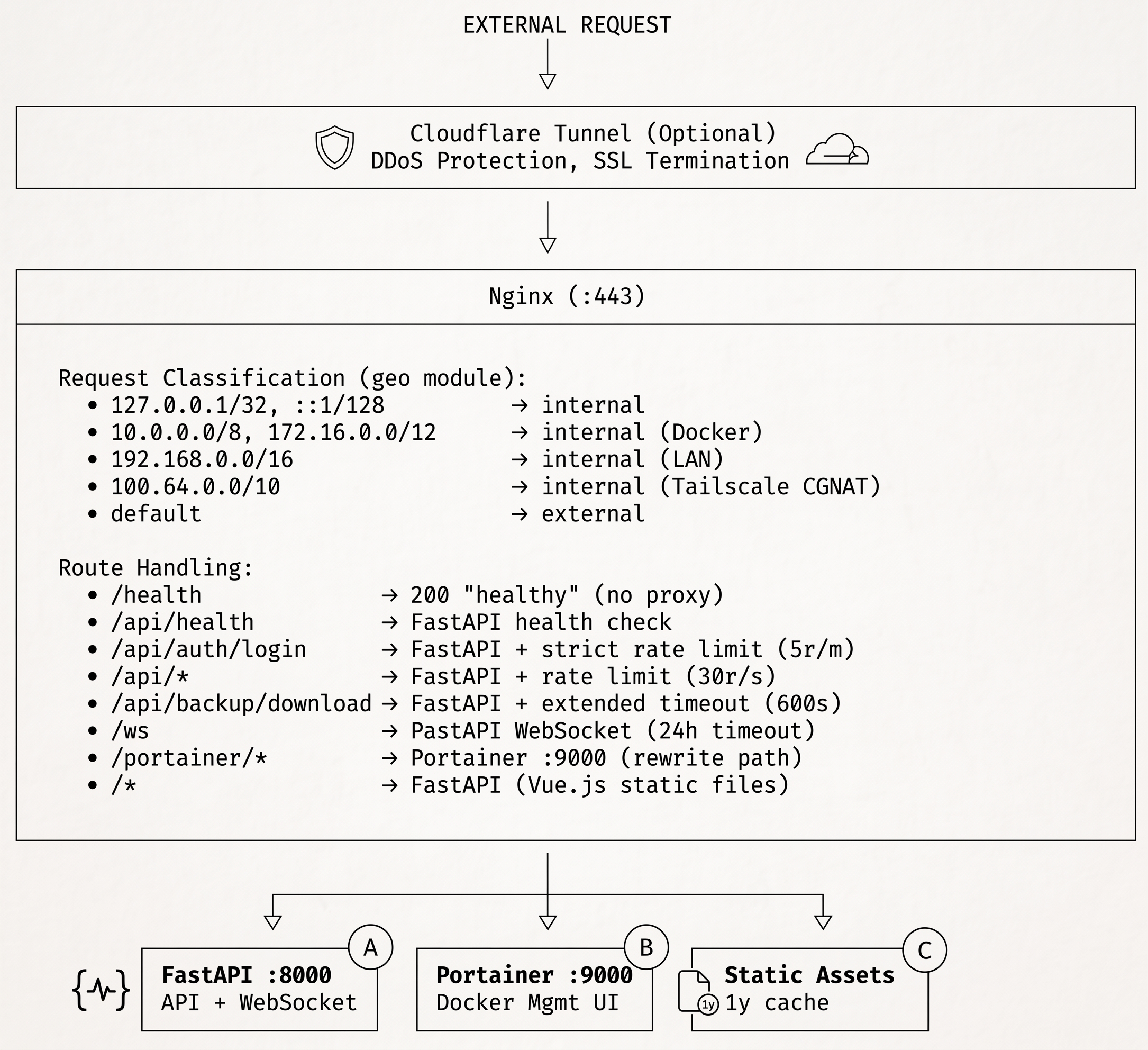
Heartbeat System Architecture
The heartbeat system ensures reliable communication between GenMaster and GenSlave, with failsafe mechanisms.
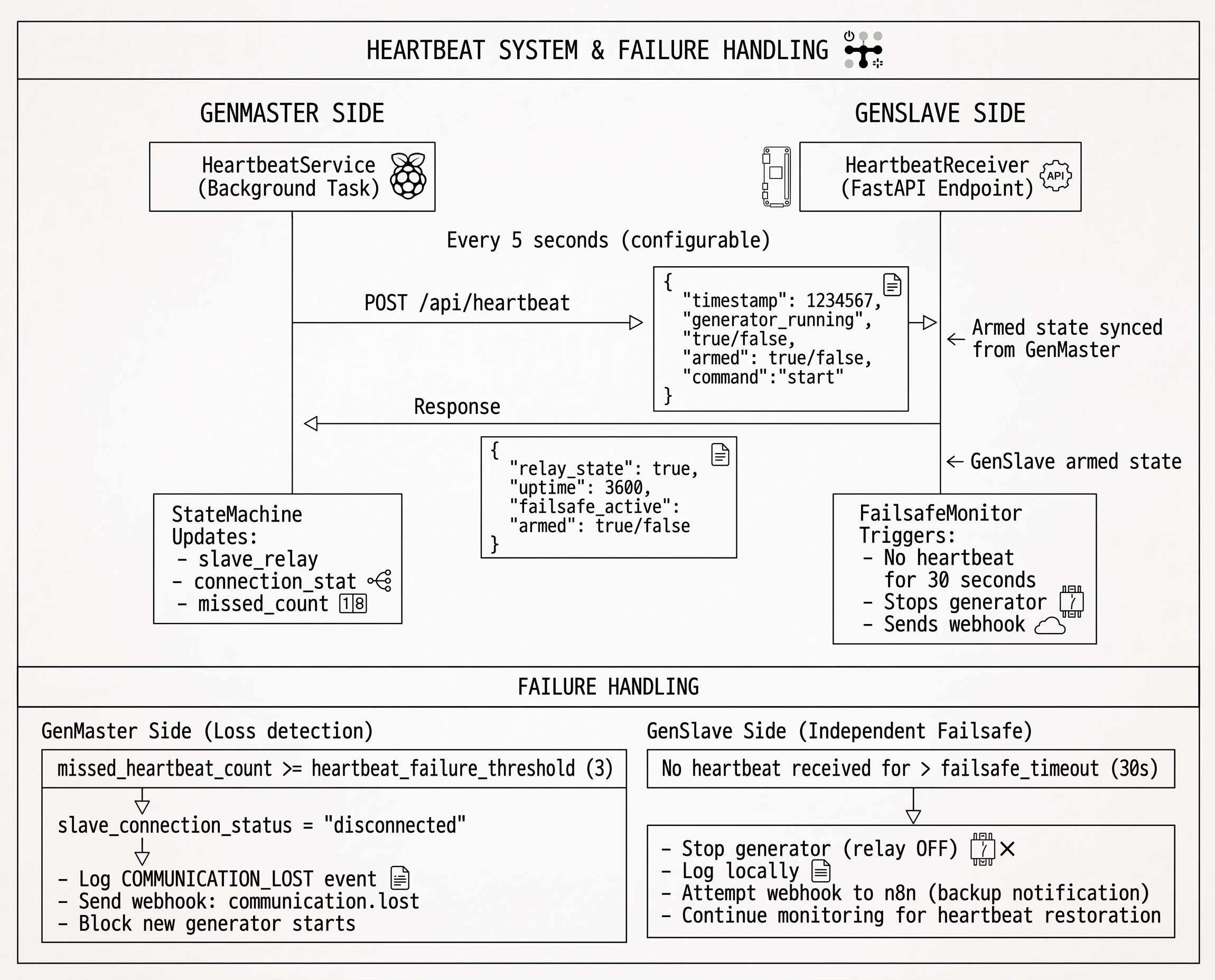
Hardware Switches — Asymmetric Design
Two optional physical control switches sit alongside the web UI: a GenSlave EPO (Emergency Power Off) mushroom button at the generator, and a GenMaster HOA (Hand-Off-Auto) selector at the operator location. The design is intentionally asymmetric — the two switches solve different problems, live in different places, and use different enforcement mechanisms.
| Switch | Location | Type | Enforcement | Purpose |
|---|---|---|---|---|
| EPO | At the generator (with GenSlave) | 1 NC + 1 NO E-stop | Hardware — physically interrupts the relay-to-generator wire, AND signals software | Maintenance lockout. The maintenance person at the generator has an absolute physical guarantee no one starts the generator. |
| HOA selector | At the operator location (with GenMaster) | 2 NO rotary contacts (Quiet / Auto / Run) | Software, with hardware position detection | Operator-side mode selector. No physical safety — convenience only. |
Rationale for the asymmetry
The EPO protects the person at the generator. A stuck contact, a software bug, a crashed Pi, or a network outage cannot start the generator while the EPO is engaged because the NC contact in the start-relay circuit is physically open. The software-signaling NO contact exists only to keep state consistent (drive UI banners, fire notifications, refuse start commands) — it is not what protects the maintenance person. Hardware enforcement is the safety guarantee. See SECURITY.md for the full safety pattern.
The HOA helps the operator make routine choices — silence the generator overnight (Quiet), let automation run (Auto), or run the generator manually (Run). Its worst-case failure mode is "automation runs anyway", which is exactly what happens today with no switch at all. There's no physical risk if HOA fails, so there's no need for hardware enforcement.
EPO state flow (heartbeat-based auto-resume)
[Operator presses EPO]
    ↓
GenSlave: hardware_safety.py polls IN1 every 25 ms (2-read debounce → ~50 ms)
    ↓
Drops the GenSlave relay if it was holding it on.
Sets physical_safety_engaged = True in GenSlave state.
LCD line "Generator: ARMED" → "EPO SAFETY ON".
    ↓
On the next heartbeat (≤60 s; the fast-poll loop catches it within ~5 s):
    GenMaster.state_machine.update_slave_physical_safety_from_poll()
    ↓
system_state.slave_physical_safety_engaged = True
hardware_safety_engaged_genslave notification fires.
UI: red banner appears on Generator page, Emergency Stop card dims,
    Start/Stop Generator buttons render disabled.
start_generator() refuses all callers with 409 + detail message.

[Operator twists EPO clockwise to release]
    ↓
NC contact closes, NO contact opens.
GenSlave clears physical_safety_engaged. LCD returns to "Generator: ARMED".
    ↓
Next heartbeat / fast-poll:
GenMaster clears the flag.
hardware_safety_released_genslave notification fires.
If Victron was still requesting the generator, GenMaster starts it on
the next state-machine tick — there is no separate "rearm" step.
The auto-resume is intentional: the EPO is a maintenance lockout, not a "stop automation" button. Operators who want to stop automation without engaging the EPO use the HOA selector's Quiet position.
HOA state machine precedence
The HOA selector reads two NO contacts on GenMaster GPIO22 (Quiet) and GPIO27 (Run). The two-bit encoding gives four possible states: Auto (both open), Quiet (GPIO22 closed), Run (GPIO27 closed), and Fault (both closed — mechanically impossible on the rotary, so reported as Fault and treated as Auto). The state machine consults HOA inside its decision points:
- EPO check — refuse all start paths if
slave_physical_safety_engagedis True. (Hardware-side guarantee makes this advisory, but it keeps state consistent.) - HOA Quiet check — refuse automation-triggered starts (Victron, scheduled, exercise) if HOA is in Quiet AND no override is active. Manual web starts and HOA-Run bypass this.
- Existing state machine logic — arming, run-time limits, cooldown, etc.
The state-machine precedence stack from top to bottom: EPO (hardware), HOA Run (operator hold), Quiet override (operator bypass), HOA Quiet (operator gate), existing arming/limits, Victron/schedule/exercise. Higher entries override lower ones.
Quiet override
The Quiet override lets an operator temporarily ignore the HOA Quiet position from the web UI without physically turning the knob. Stored in two columns on system_state (quiet_override_active, quiet_override_expires_at). Survives GenMaster restart — reconciled on boot. Auto-clears when: the timer expires, the operator clicks Cancel, OR the HOA selector leaves Quiet (since the override only matters while the selector is in Quiet).
Configuration
- Pin assignments —
VICTRON_GPIO_PIN,HOA_GPIO_QUIET,HOA_GPIO_RUNin GenMaster's.env, also writable from the System → Hardware → GPIO Assignments panel. Bound at monitor start so changes require a GenMaster restart. - Boot delay —
HOA_BOOT_DELAY_SECONDS(default 30 s). Post-boot grace window so a Quiet or Run position at boot doesn't immediately fire spurious state-change notifications. - Switch enable —
HARDWARE_SAFETY_ENABLED(GenSlave) andHOA_SWITCH_ENABLED(GenMaster). Disable to skip monitor startup on systems where the switches aren't wired yet. Cannot bypass the EPO once installed — the NC contact in the start circuit is unaffected by the flag.
Operator guide: Hardware Switches.
Boot Sequence / Power Loss Recovery
Both GenMaster and GenSlave implement safety measures for power loss and reboot scenarios.
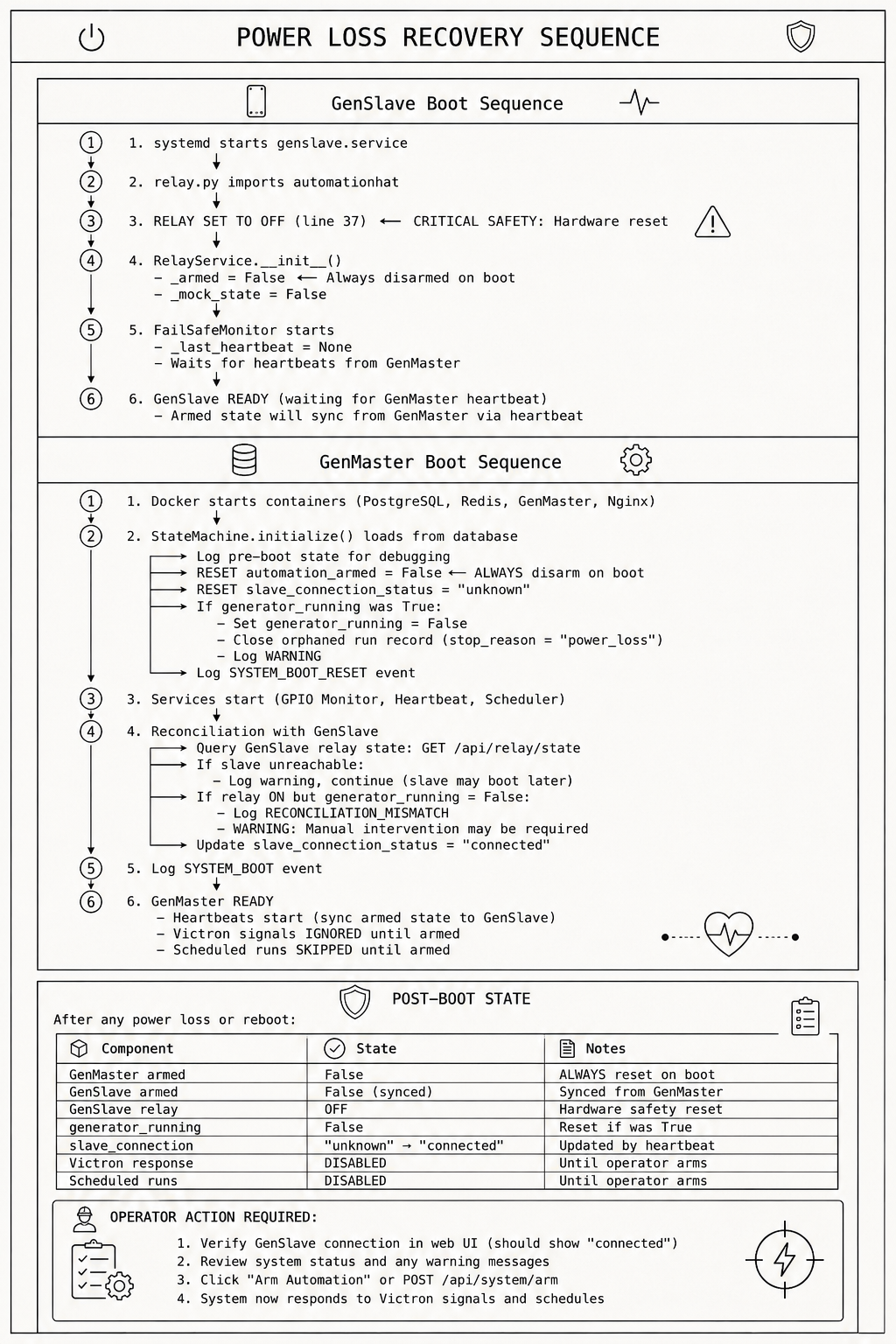
Boot Arming Policy
GenMaster's behavior on reboot is controlled by an operator-configurable policy
(config.boot_arming_policy), exposed in the UI under
Generator → Boot Arming Policy. The setting is stored in the database
and persists across reboots. There are two valid values:
| Policy | What happens on GenMaster boot | When to use it |
|---|---|---|
fail_safe (default) |
If the relay was armed pre-boot, it is disarmed. manual_disarm_active is set. A boot_disarmed_failsafe notification fires so the operator knows the generator will not start until they re-arm it via the UI. |
Default for safety. Recommended for any installation where unsupervised auto-restart is undesirable. |
preserve_state |
The pre-boot armed state is preserved. The generator can resume operation automatically after a power outage. | Only when your installation can safely auto-resume (proper ATS, weatherproofing, fuel/CO safety, operator awareness). |
Runtime GenSlave reconnects (when GenSlave drops out and reconnects during
normal operation) are handled by the heartbeat-driven sync — GenSlave reads
armed from every heartbeat and matches GenMaster's DB, with no separate
configuration needed.
GenSlave on reboot (always the same)
Unlike GenMaster, GenSlave has no per-policy choice. On reboot it always:
- Comes up with
_armed = Falseand the relay physically OFF - Treats the first heartbeat from GenMaster as authoritative for both armed state and relay state — so within ~1 heartbeat cycle (~10s default) it ends up matching whatever GenMaster says
- If GenMaster is in
fail_safeand disarmed itself on boot, GenSlave stays disarmed. If GenMaster is inpreserve_stateand was armed, GenSlave re-arms via "self-heal" sync.
Reconciliation Events
| Event | Severity | Description |
|---|---|---|
SYSTEM_BOOT_RESET |
WARNING/INFO | Logged on every boot. Now includes boot_arming_policy and relay_disarmed_by_policy so the log accurately reflects what happened. |
RECONCILIATION_MISMATCH |
WARNING | GenSlave relay ON but no active run in GenMaster |
boot_disarmed_failsafe (notification) |
WARNING | Sent to configured channels when fail_safe policy disarms the relay. Tells the operator they need to re-arm. |
Database Fields Reset on Boot
-- Always reset
slave_connection_status = 'unknown'
missed_heartbeat_count = 0

-- Reset based on boot_arming_policy
slave_relay_armed = False        -- ONLY if policy = 'fail_safe' AND was armed pre-boot
manual_disarm_active = True      -- Set when fail_safe disarms (records operator-must-re-arm intent)

-- Reset if generator was running (regardless of policy)
generator_running = False
run_trigger = 'idle'
generator_start_time = NULL
current_run_id = NULL  -- After closing orphaned run
State Machine Flow
The StateMachine class (state_machine.py) is the central controller for generator operations.
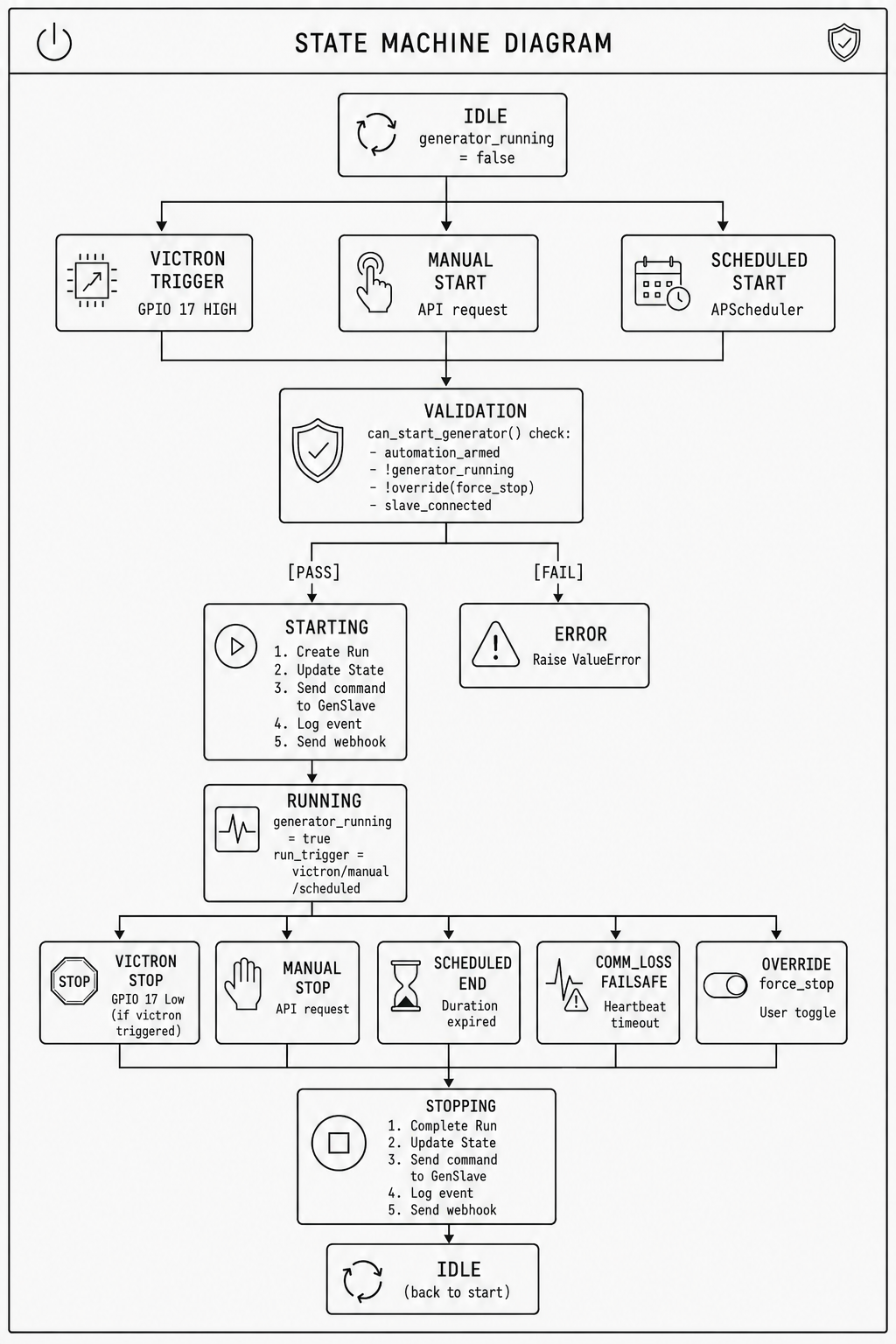
Automation Arming System
The arming system is a safety layer that prevents automated actions during startup, maintenance, or testing. Automation is disarmed by default and must be explicitly armed by an operator.
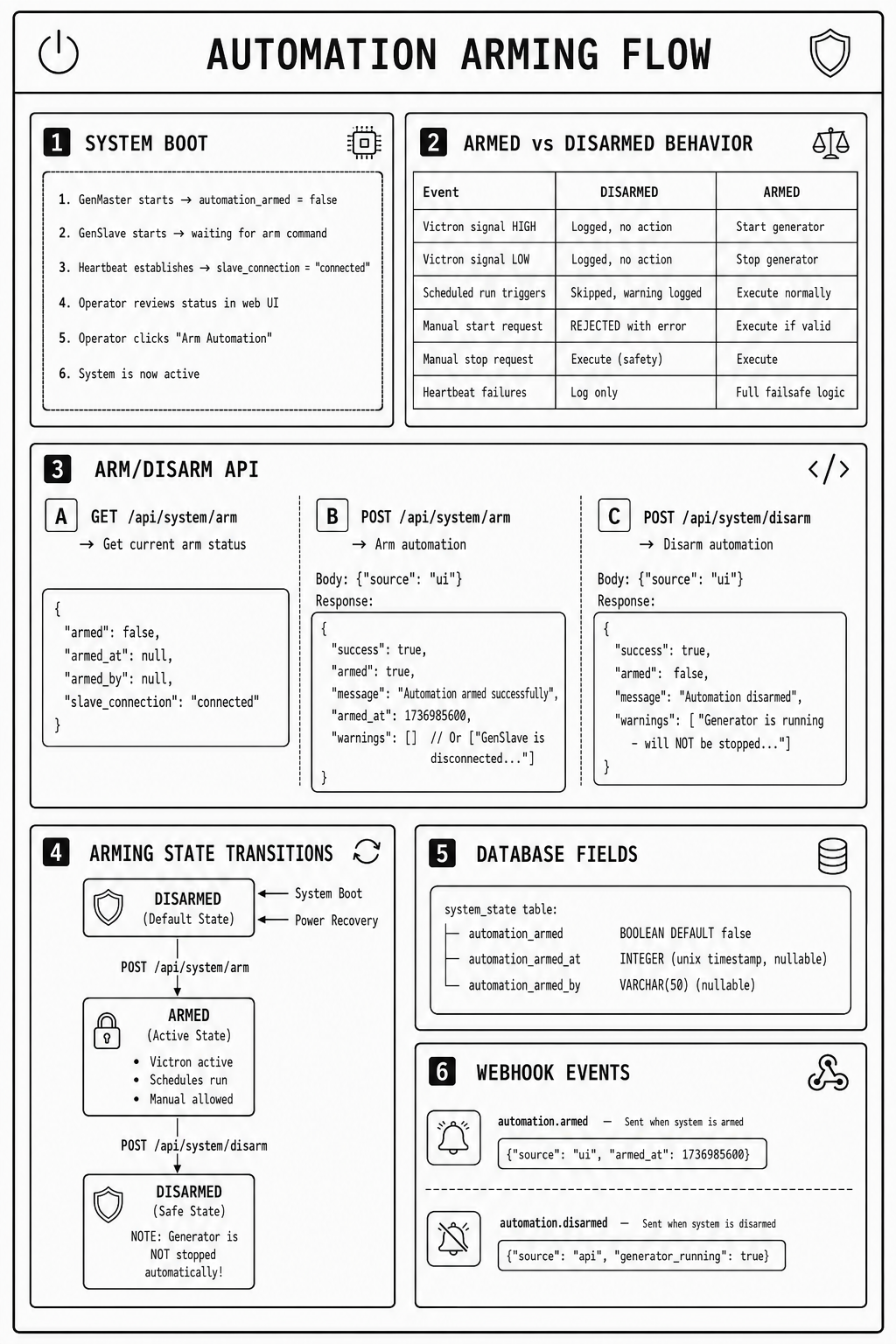
Arming Integration Points
- Victron Signal Handler (
handle_victron_signal_change) - Checks
automation_armedbefore taking action -
Logs signal changes regardless of arm state
-
Start Generator (
start_generator) can_start_generator()requiresautomation_armed == true-
Returns clear error: "Cannot start - automation is not armed"
-
Scheduler (
_execute_scheduled_run) - Checks
is_armed()before executing -
Logs skipped runs with reason
-
Full Status (
get_full_status) - Includes
automation_armedin system status response
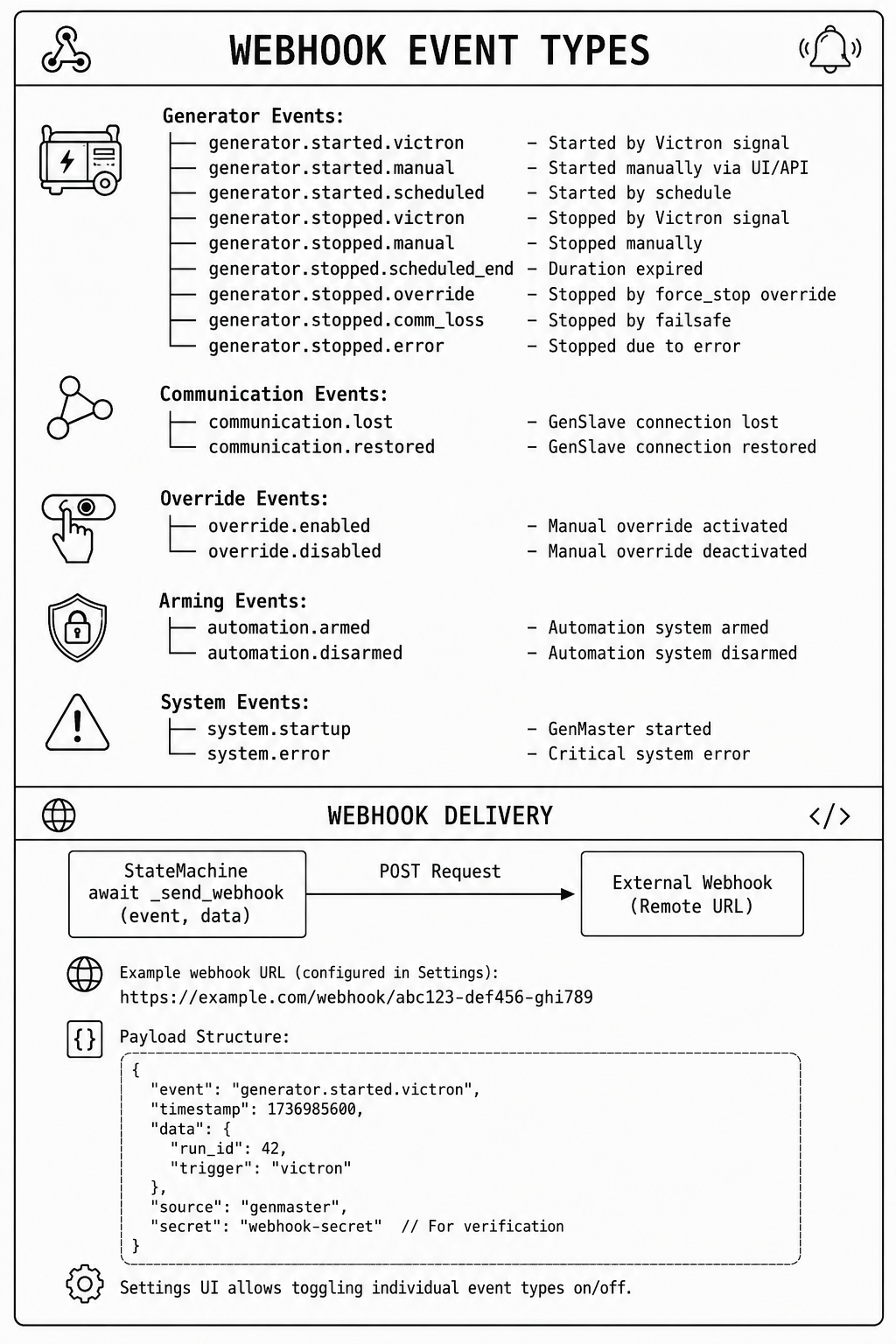
Webhook Event System
The webhook system sends notifications to external services (like n8n) for various system events.
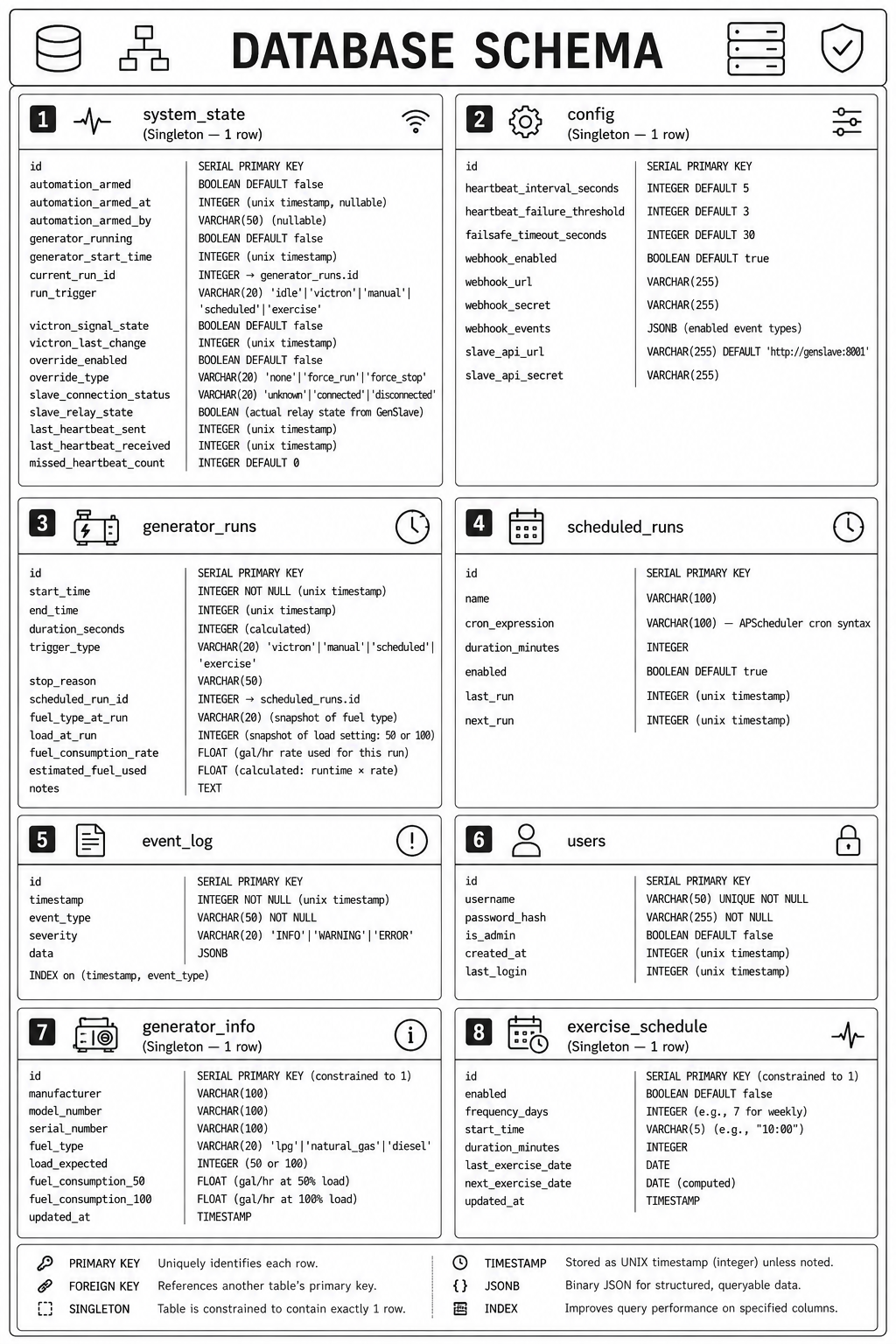
Database Schema Overview
PostgreSQL 16 with asyncpg driver for async operations.
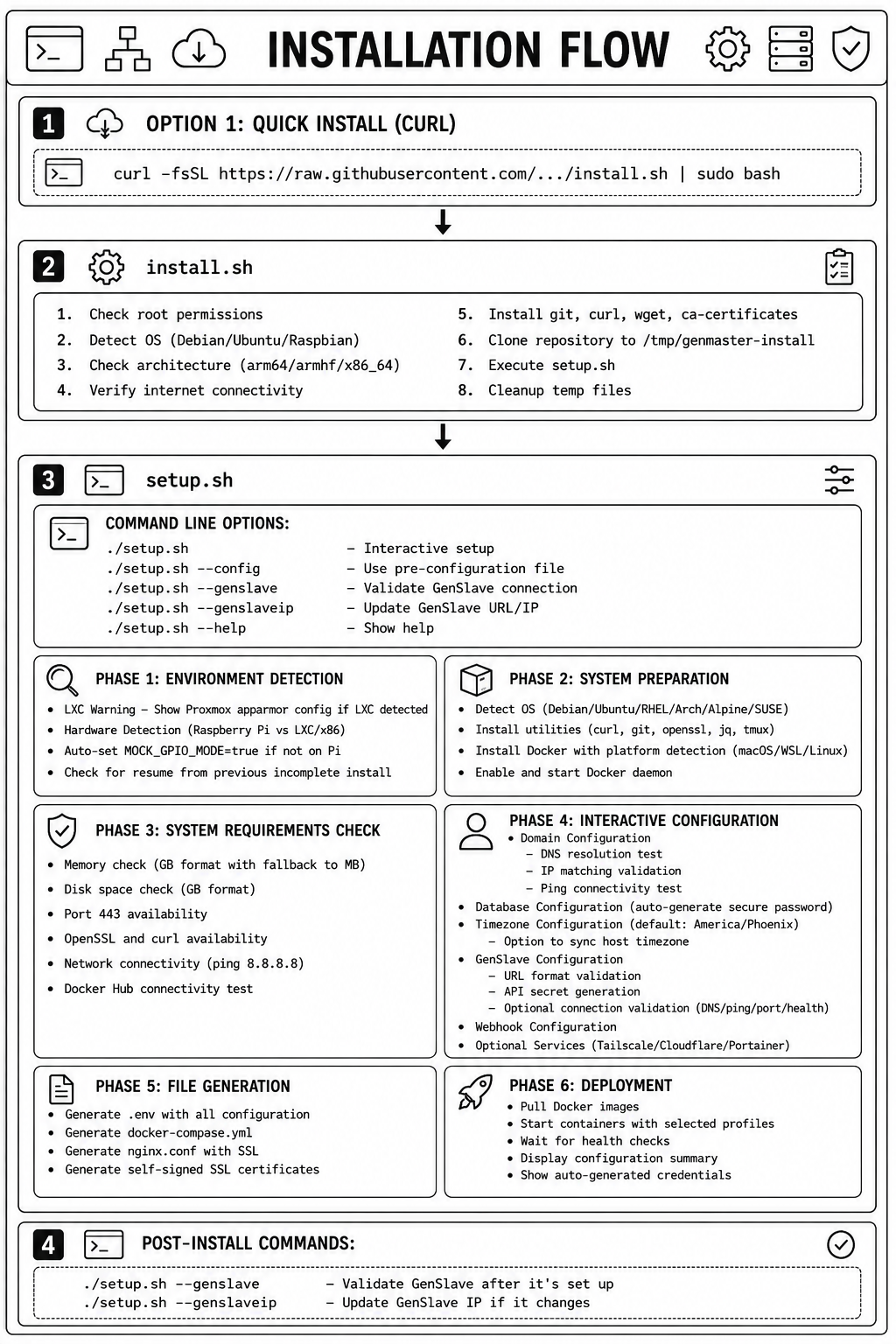
Installation & Setup Flow
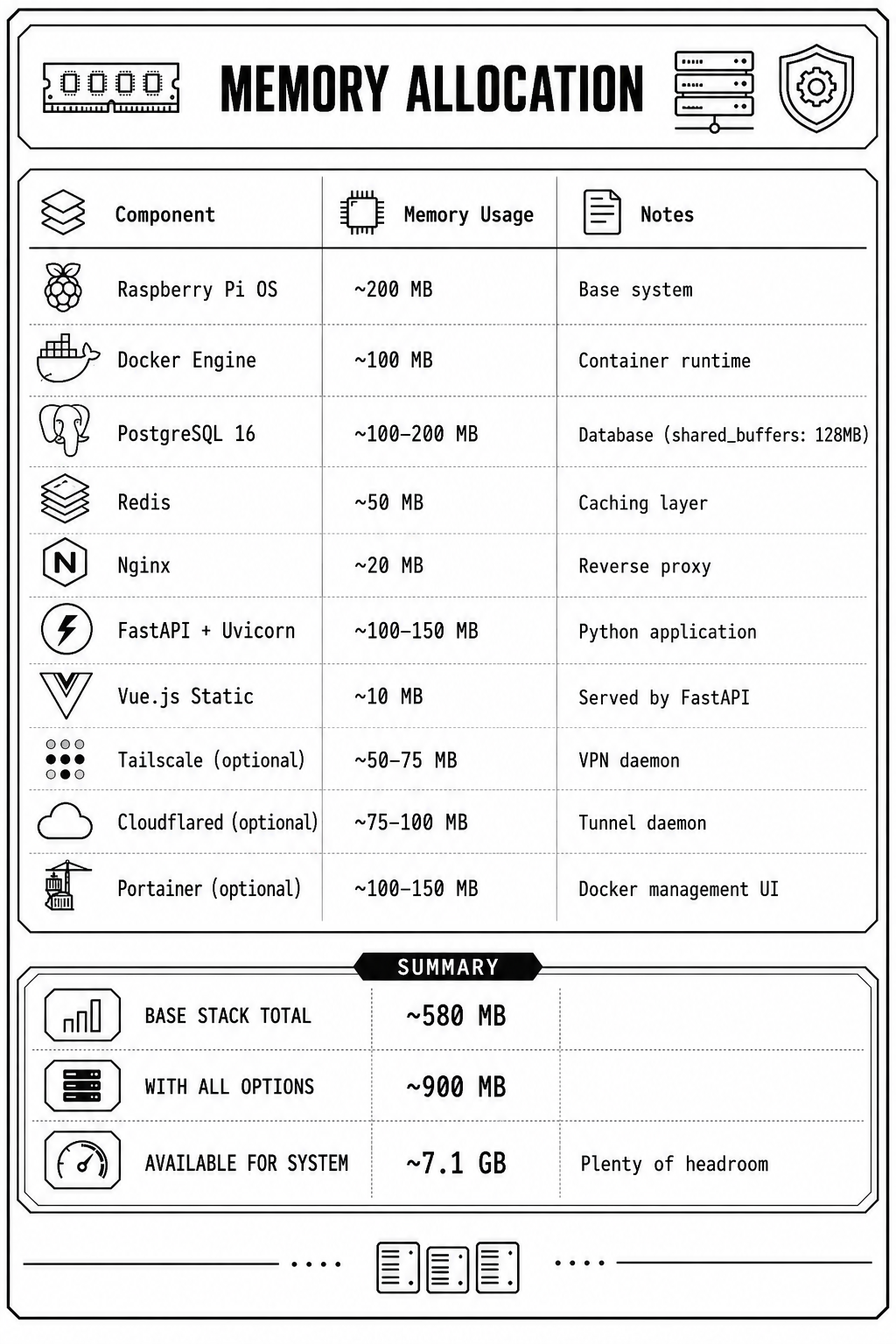
Memory Budget (Raspberry Pi 5 - 8GB)
Port Reference
| Service | Internal Port | External Access | Notes |
|---|---|---|---|
| Nginx | 443 | Yes (HTTPS only) | Main entry point |
| FastAPI | 8000 | No (internal only) | Backend API |
| PostgreSQL | 5432 | No (internal only) | Database |
| Redis | 6379 | No (internal only) | Cache |
| Portainer | 9000 | /portainer/ path | Optional profile |
| GenSlave API | 8001 | Tailscale only | On Pi Zero 2W |
Security Layers
- Network Level
- Tailscale mesh VPN (WireGuard encryption)
- UFW firewall rules
-
Docker network isolation
-
Application Level
- Nginx rate limiting (API: 30r/s, Auth: 5r/m)
- JWT authentication for API
- API secret for GenSlave communication
-
Webhook secret for external services
-
Transport Level
- HTTPS via Tailscale certs or Cloudflare
-
Nginx security headers (X-Frame-Options, X-XSS-Protection, etc.)
-
Access Control
- Nginx geo module — IP allowlist gating the entire 443 interface (UI, API, websocket, health, Portainer); off-list clients receive HTTP 403
- Tailscale ACLs (tag-based access)
- Cloudflare Access (optional additional auth)
Development/Testing Mode (LXC Containers)
GenMaster can run in LXC containers for testing without real GPIO hardware.
Auto-Detection
- GenMaster automatically detects when NOT running on a Raspberry Pi
- Falls back to mock GPIO mode (checks
/proc/cpuinfofor "Raspberry Pi") - Development API becomes available at
/api/dev/*
Development API Endpoints
When in mock mode, these endpoints simulate Victron GPIO signals:
GET  /api/dev/status           - Development mode status
GET  /api/dev/gpio/state       - Current mock GPIO state
POST /api/dev/gpio/victron-signal  - Simulate Victron signal {"active": true/false}
POST /api/dev/gpio/toggle      - Toggle signal state
POST /api/dev/gpio/reset       - Reset to inactive
POST /api/dev/webhook/test     - Test webhook delivery
Testing a Generator Cycle
# Start GenMaster (auto-detects LXC/dev environment)
docker compose up -d

# Simulate Victron requesting generator
curl -X POST http://localhost:8000/api/dev/gpio/victron-signal \
     -H "Content-Type: application/json" \
     -d '{"active": true}'

# Watch state transition: IDLE → STARTING → RUNNING

# Simulate Victron releasing generator
curl -X POST http://localhost:8000/api/dev/gpio/victron-signal \
     -H "Content-Type: application/json" \
     -d '{"active": false}'

# Watch state transition: RUNNING → STOPPING → IDLE
Related Documentation
- Generator Controls - Start, stop, and monitor operations
- Scheduling - Automated and exercise runs
- GenSlave Setup - Hardware and installation
- Victron Integration - GPIO signal monitoring
- Tailscale VPN - Secure device communication
- Cloudflare Tunnel - Remote access setup
- Troubleshooting - Common issues and solutions