GenSlave Setup Guide
This guide covers how to set up and configure GenSlave, the relay controller component that runs on a Raspberry Pi Zero 2W.
Table of Contents
- Overview
- Hardware Requirements
- Installation
- Configuration
- API Reference
- Failsafe System
- WiFi Configuration
- Scheduled Reboot
- Troubleshooting
Overview
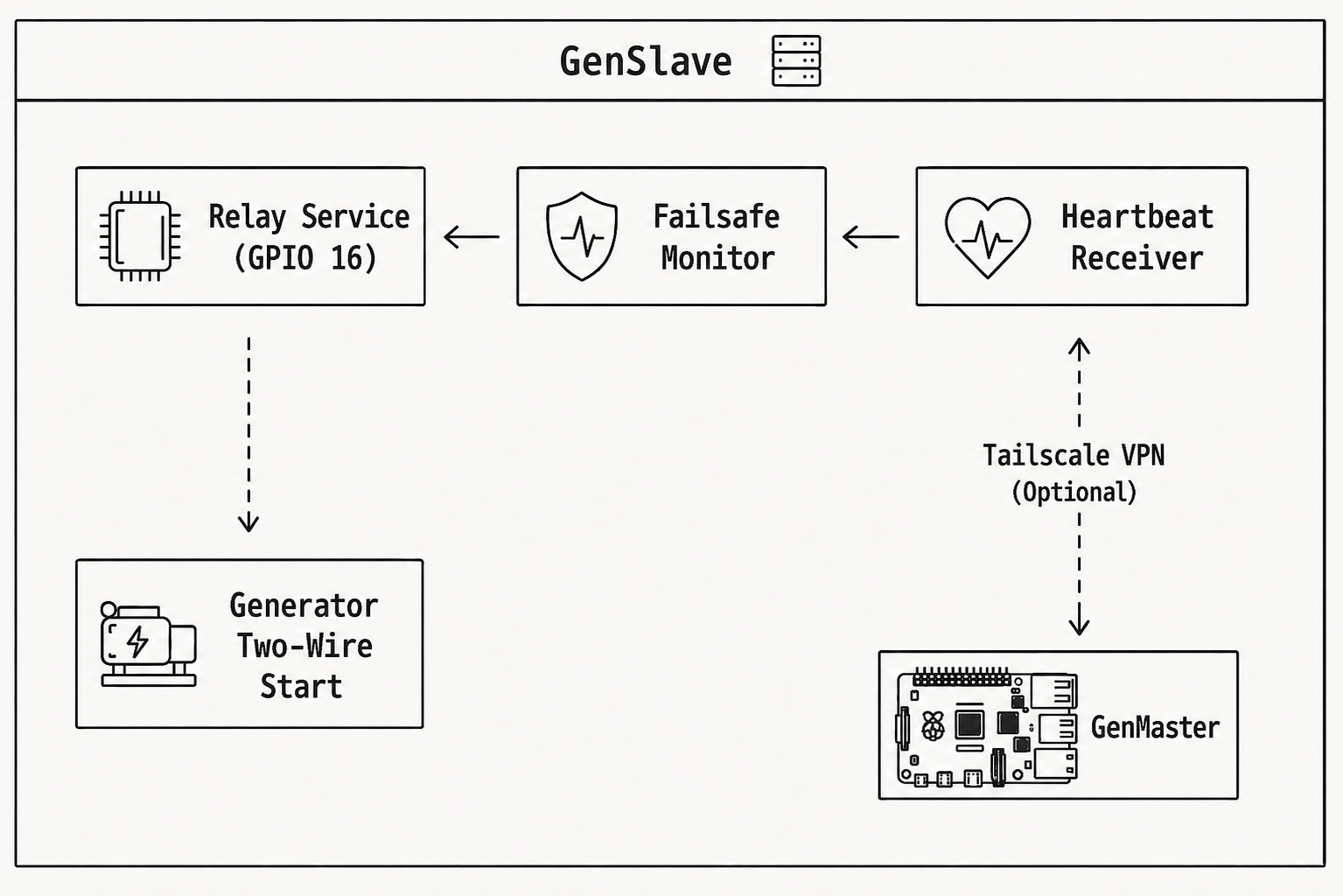
GenSlave is a lightweight FastAPI application that:
- Controls the relay connected to your generator's two-wire start input
- Receives heartbeats from GenMaster and synchronizes state
- Triggers failsafe if communication with GenMaster is lost
- Displays status on the LCD screen (Automation Hat Mini)
- Sends notifications via Apprise when failsafe triggers
Architecture
Hardware Requirements
Raspberry Pi Zero 2W
| Spec | Requirement |
|---|---|
| Model | Pi Zero 2W (recommended) or Pi Zero W |
| RAM | 512MB (sufficient for GenSlave) |
| Storage | 8GB+ microSD card |
| Power | 5V 2.5A power supply |
Automation Hat Mini
The Pimoroni Automation Hat Mini provides:
- 1 Relay - 24V 2A switching (connects to generator)
- 1 LCD - 160x80 pixel display for status
- 3 Inputs - Digital/analog inputs (not used)
- 1 Output - Additional output (not used)
Wiring
Connect the Automation Hat Mini relay to your generator's two-wire start terminal:
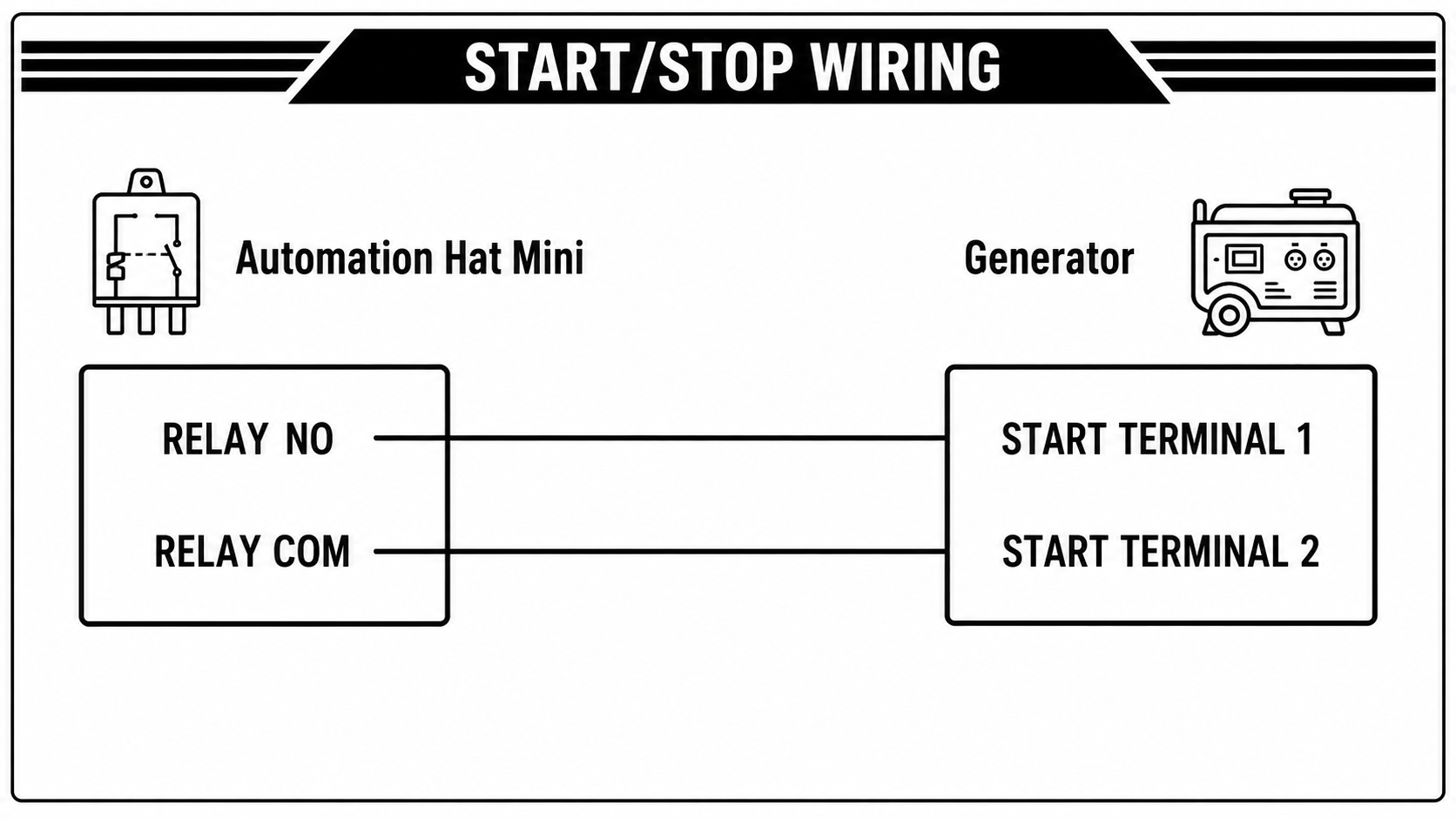
- NO = Normally Open
- COM = Common
- Use appropriate gauge wire for your installation
Warning: Consult your generator's manual and a qualified electrician before making connections.
Installation
Quick Start with Pre-built Image
# SSH into your Pi Zero 2W
ssh pi@your-pi-zero.local

# Create installation directory
sudo mkdir -p /opt/genslave
cd /opt/genslave

# Download docker-compose.yaml
curl -O https://raw.githubusercontent.com/rjsears/pizero_generator_control/main/genslave/docker-compose.yaml

# Create .env file (see Configuration section)
nano .env

# Start GenSlave
docker compose up -d
Building from Source
If you need to build for your specific architecture:
# Clone the repository
git clone https://github.com/rjsears/pizero_generator_control.git
cd pizero_generator_control/genslave

# Build for ARM (Pi Zero)
docker buildx build --platform linux/arm/v7 -t genslave:local .

# Update docker-compose.yaml to use local image
# Change: image: rjsears/pizero_generator_control:genslave
# To: image: genslave:local

docker compose up -d
Verifying Installation
# Check container status
docker compose ps

# Check logs
docker compose logs -f

# Test health endpoint
curl http://localhost:8001/api/health
Configuration
Environment Variables
Create /opt/genslave/.env:
# Required: API secret (must match GenMaster's GENSLAVE_API_SECRET)
GENSLAVE_API_SECRET=your-secure-secret-here

# Optional: Failsafe timeout (seconds before failsafe triggers)
FAILSAFE_TIMEOUT_SECONDS=30

# Optional: Mock mode for testing without hardware
MOCK_HAT_MODE=false

# Optional: Apprise notification URLs (comma-separated)
APPRISE_URLS=tgram://bottoken/chatid

# Optional: Log level
LOG_LEVEL=INFO
Configuration Reference
| Variable | Description | Default |
|---|---|---|
GENSLAVE_API_SECRET |
Shared secret for API authentication | Required |
FAILSAFE_TIMEOUT_SECONDS |
Seconds without heartbeat before failsafe | 30 |
MOCK_HAT_MODE |
Run without actual hardware | false |
APPRISE_URLS |
Notification service URLs | Empty |
LOG_LEVEL |
Logging verbosity | INFO |
HOST |
Bind address | 0.0.0.0 |
PORT |
Listen port | 8001 |
Docker Compose
The standard docker-compose.yaml:
services:
  genslave:
    image: rjsears/pizero_generator_control:genslave
    container_name: genslave
    restart: unless-stopped
    env_file: .env

    # Required for GPIO access
    privileged: true

    # Use host network for Tailscale
    network_mode: host

    volumes:
      - genslave_data:/opt/genslave/data
      - genslave_logs:/opt/genslave/logs
      - /var/run/dbus:/var/run/dbus:rw  # For WiFi management

    healthcheck:
      test: ["CMD", "python3", "-c", "import httpx; httpx.get('http://localhost:8001/api/health', timeout=5)"]
      interval: 30s
      timeout: 10s
      retries: 3

volumes:
  genslave_data:
  genslave_logs:
API Reference
GenSlave exposes a REST API on port 8001. Every endpoint requires the X-API-Key header. Authentication is mandatory — GenSlave refuses to start without a configured secret, and there is no opt-out flag. The secret is auto-generated by setup.sh (or pasted from an existing GenMaster install). See Security: GenMaster ↔ GenSlave authentication for the full rationale.
Health & Status
| Method | Endpoint | Description |
|---|---|---|
| GET | /api/health |
Health check with system status |
| GET | /api/failsafe |
Failsafe monitor status |
Relay Control
| Method | Endpoint | Description |
|---|---|---|
| GET | /api/relay/state |
Get relay and arm status |
| POST | /api/relay/on |
Turn relay ON (requires armed) |
| POST | /api/relay/off |
Turn relay OFF (always allowed) |
| POST | /api/relay/arm |
Arm the automation |
| POST | /api/relay/disarm |
Disarm the automation |
Heartbeat
| Method | Endpoint | Description |
|---|---|---|
| POST | /api/heartbeat |
Receive heartbeat from GenMaster |
System
| Method | Endpoint | Description |
|---|---|---|
| GET | /api/system |
System info (CPU, RAM, disk, network) |
| POST | /api/system/reboot |
Reboot the Pi |
| POST | /api/system/shutdown |
Shutdown the Pi |
Example Requests
# Get relay state
curl http://genslave:8001/api/relay/state \
  -H "X-API-Key: YOUR_SECRET"

# Arm the relay
curl -X POST http://genslave:8001/api/relay/arm \
  -H "X-API-Key: YOUR_SECRET"

# Turn relay ON
curl -X POST http://genslave:8001/api/relay/on \
  -H "X-API-Key: YOUR_SECRET"
Failsafe System
The failsafe system is an independent safety mechanism that stops the generator if GenMaster communication is lost.
How It Works
- GenMaster sends heartbeats every 10 seconds
- GenSlave tracks last heartbeat timestamp
- If no heartbeat received within timeout period:
- Relay is turned OFF (generator stops)
- Notification is sent (if configured)
failsafe_triggeredflag is set- When heartbeat resumes:
- Failsafe state is cleared
- "Restored" notification is sent
- GenMaster can re-arm and restart if needed
Dynamic Timeout
The failsafe timeout is calculated dynamically:
GenMaster sends its heartbeat interval in each heartbeat, and GenSlave calculates 3 × interval as the timeout. This means:
- Default heartbeat: 10 seconds → Timeout: 30 seconds
- Custom heartbeat: 15 seconds → Timeout: 45 seconds
This allows the system to adapt if heartbeat timing changes.
Failsafe Status
Check failsafe status:
Response:
{
  "running": true,
  "last_heartbeat": 1714567890,
  "seconds_since_heartbeat": 5,
  "heartbeat_count": 1234,
  "failsafe_triggered": false,
  "timeout_seconds": 30,
  "heartbeat_interval": 10,
  "timeout_source": "genmaster"
}
When Failsafe Triggers
- Relay OFF is forced (even if armed)
- Notification sent via Apprise (if configured)
- Log entry created
- GenSlave continues accepting heartbeats - when restored, it will sync with GenMaster
WiFi Configuration
GenSlave includes WiFi management endpoints for configuration via GenMaster.
Scan for Networks
Add Known Network
Pre-configure a WiFi network for auto-connect:
curl -X POST http://genslave:8001/api/system/wifi/add \
  -H "X-API-Key: YOUR_SECRET" \
  -H "Content-Type: application/json" \
  -d '{
    "ssid": "MyNetwork",
    "password": "my-password",
    "auto_connect": true
  }'
Connect to Network
curl -X POST http://genslave:8001/api/system/wifi/connect \
  -H "X-API-Key: YOUR_SECRET" \
  -H "Content-Type: application/json" \
  -d '{
    "ssid": "MyNetwork",
    "password": "my-password"
  }'
Note: WiFi management requires the D-Bus socket to be mounted (
/var/run/dbus:/var/run/dbus:rw).
Scheduled Reboot
GenSlave supports scheduled maintenance reboots for long-term reliability.
Configuration
Via API (proxied through GenMaster):
curl -X POST https://your-genmaster/api/genslave/reboot-schedule \
  -H "Authorization: Bearer YOUR_TOKEN" \
  -H "Content-Type: application/json" \
  -d '{
    "enabled": true,
    "day": "sunday",
    "hour": 4,
    "minute": 0
  }'
Settings
| Field | Description | Options |
|---|---|---|
enabled |
Enable/disable scheduled reboots | true/false |
day |
Day of week or daily | monday-sunday or daily |
hour |
Hour (24-hour format) | 0-23 |
minute |
Minute | 0-59 |
Safety Check
The scheduled reboot only executes if: - The relay is OFF (generator not running) - Schedule is enabled - Current time matches schedule
If the generator is running at the scheduled time, the reboot is skipped for that day.
Troubleshooting
GenSlave Not Starting
-
Check Docker logs:
-
Verify GPIO access:
- Ensure
privileged: truein docker-compose.yaml -
Or use device mappings for
/dev/gpiomem -
Check port availability:
Failsafe Keeps Triggering
-
Check network connectivity:
-
Verify API secret matches between GenMaster and GenSlave
-
Check GenMaster heartbeat service:
Relay Not Working
- Verify hardware connection:
- Check Automation Hat Mini is properly seated
-
Verify wiring to generator
-
Test in mock mode: Set
MOCK_HAT_MODE=trueto test software without hardware -
Check relay manually:
Cannot Reach GenSlave
-
Check Tailscale status:
-
Verify port is listening:
-
Check firewall:
LCD Not Displaying
-
Check SPI is enabled:
-
Verify automationhat import:
Logs
View logs:
# Real-time logs
docker compose logs -f genslave

# Last 100 lines
docker compose logs --tail=100 genslave
Log files are persisted to the genslave_logs volume.
Updating
cd /opt/genslave

# Pull latest image
docker compose pull

# Restart with new image
docker compose up -d

# Verify update
docker compose logs -f
Next Steps
- Generator Controls - How GenMaster controls GenSlave
- Tailscale Setup - Secure communication between devices
- Notifications - Configure failsafe alerts
- Troubleshooting - Common issues and solutions